

| Attendees | Toastmaster | Judges | Speech Contestants | Evaluation Contestants | Timers | Sergeant at Arms | Ballot Counters |
| Using Z00M -- Everyone | ZOOM duties for staff | ZOOM duties for Contestants | Breakout Rooms |
| | |
---
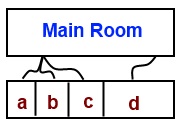
Contestants go into a room away from the crowd to recieve detailed instructios. Judges go into a private room to vote on who should win. Ballot Counters do their counting in a private room. The Contest Chairs, do their deliberations in a private room. |

Breakout Rooms are separate spaces set
aside to allow different activities to take place simultaneously, and
to assure privacy for the judges, ballot counters, and contestants at
appropriate times.
Contest staff will move people in and out of these rooms at the
appropriate times. If you see an invitation to enter a room, please
click the the icon that will bring you there.
| Contest
Stage area room (General Viewing room) |
Attendee Orientation Room | Chief Judge Room | Judges' Quiet Room | Contest Chair Room |
Sergeant at Arms Room |
| Room Logistics |
Contest Stage area room (General Viewing)
- Contest stage area. This is the stage, aka speaking area. Attendees who are not contestants or staff will remain in this area for the duration of the meeting, it is the place that everything public takes place. Here you will view the staff conduct the contest and view the contestants as they speak.
At the beginning of the meeting, the audience and contestants will be briefed on room ediquite. Contestants will recieve a more extensive briefing in another room.
The Speaking Area is the room that the contestant is in for this contest. Contestants are not allowed to zoom in and zoom out electronically. Nor can they zoom in by walking extremely close to the camera and zoom out by walking extremely far away. Bear in mind, Contestants CAN utilize the stage area by moving about as one would do at a regular contest. If the contestant goes off camera, it is NOT a violation of stage area. However, Judges may decide if any action enhances or detracts from the performance.
Any technical questions will be ansered before the meeting starts.
Chief Judge Breakout Room
Purpose:
This
is the breakout room that Ballot Counters and Chief Judge will be in
awaiting the Voting Judges to enter and place their votes.
Participants
who have access:
Chief
Judge, Assistant Chief Judge, Ballot Counters, ALL voting judges,
Division Director, Certificate maker, Zoom Master and Assistant Zoom
Masters.
During the “unlimited silence for judges to complete their ballots,” initially,
three Ballot Counters will be placed in the Chief Judge breakout
room. The Ballot Counters should be reminded by Zoom Master to
entertain themselves until the Chief Judge arrives.
The Voting Judges, Chief Judge and Zoom Master will first go to the Quiet Room.
The Chief Judge will explain that when the Voting Judge is done, that
they should tell the Zoom Master who will move them to the Chief
Judge’s breakout room. Zoom Master moves the Chief Judge to the Chief
Judge’s breakout room.
When the Chief Judge moves back to the Chief Judge’s breakout room, she reminds the Ballot Counters
about how to process the ballots and the point values.
One by one, the Voting Judges are moved into the Chief Judge’s breakout room.
Once inside the Chief Judge’s breakout room, the Voting Judge types “to everyone” his/her vote.
The
Ballot Counters confirmation receipt. Then CJ thanks the Voting Judge
and directs that Judge to rejoin the main room.
The Voting Judge leaves the Chief Judge breakout room and goes back to the main room.
The Zoom Master then sends in the next Judge.
Purpose:
This is the breakout room for Voting Judges to enter at the conclusion of each contest in order to finish their deliberation.
Participants
who have access:
Chief Judge, Assistant Chief Judge, ALL Voting Judges, Division Director, Zoom Master and Assistant Zoom Masters.
After the last contestant in each contest competes, the Zoom Master will place all of the Voting Judges,
Assistant Chief Judge and the Chief Judge in this room for the scheduled unlimited silence.
Chief Judge will give/remind Voting Judges that they have unlimited silence to deliberate.
When they are ready, they need to signal to the Zoom Master that they are ready to turn in their ballot to the
Chief Judge and Ballot Counters.
One by one the Voting Judges will join [Zoom Master moves Voting Judge into Chief Judge breakout room]
the Ballot Counters and Chief Judge in the Chief Judge breakout room.
From
the Chief Judge’s breakout room, once the Chief Judge indicates she has the vote,
the Voting Judge will leave the breakout room to join the main room.
Purpose: This is the breakout room that Contest Chairs will brief the contestants of BOTH contests.
Contest Chairs will have to decide who will say which part of the script.
Participants who have access: Division Director, Area Governors, Contest Chairs, Chief Judge,
Assistant Chief Judge, ALL CONTESTANTS, Zoom Master and Assistant Zoom Masters..
Purpose: This is the breakout room that Sergeant-at-Arms brings the Evaluation Contestants.
Participants who have access: Sergeant-at-Arms, Assistant Chief Judge, District Director,
Evaluation Contestants, Zoom Master and Assistant Zoom Masters.
Go to “Sergeant-at-Arms Room” to see details on what happens in this room. Here, we list the impact to the Zoom Master.
In
the room for the 5 minutes of preparation, are the Evaluation
Contestants, Assistant Zoom Master and the Sergeant-at-Arms.
The Sergeant-at-Arms will remind contestants of a few things. Timing will start. Time is 5 minutes. Time ends.
Sergeant-at-Arms will tell Assistant Zoom Master that the first contestant is ready. Contestant 1 waits.
Other contestants fold their paperwork.
Assistant
Zoom Master checks the main room. Interrupts, if necessary, to tell the
Contest Chair that the first contestant is ready.
Assistant Zoom Master re-enters the room and tells Sergeant-at-arms to release the contestant.
Contestant enters the Main Room, performs his/her evaluation. The Contest Chair calls for minutes of silence for the judges.
During the minutes of silence, the Assistant Zoom Master re-enters the room. He/She informs Sergeant-at-Arms
to send the next contestant out. In other words, the Assistant Zoom Master is functioning as the second Sergeant-at-Arms.
Process continues until the final contestant leaves the room.
Before closing the room, Either Assistant Zoom Master or Sergeant-at-Arms must save the documentation.